A trading plan template gives you a fixed set of fields to complete before you trade, so your decisions come from rules you wrote in advance rather than from the mood of the session. For a prop firm challenge, a trading plan matters more than usual. The firm sets a daily loss limit and a maximum loss limit, and one poor day can end the attempt. This page gives you a fill-in template, a note on what each field should hold, and a filled example built on a $10,000 1-Step Pay Later account. If you are new to the model, the prop firm challenge guide explains the stages first.
What a trading plan holds
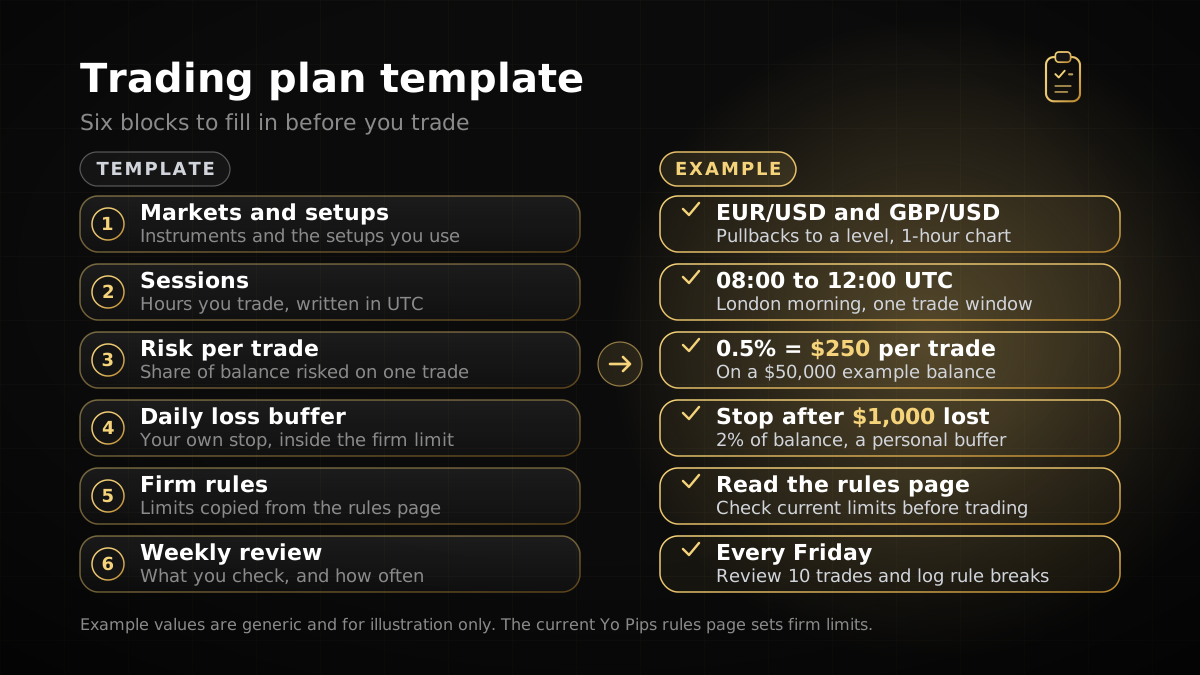
A plan is not a forecast. It does not say where price will go. It records the conditions under which you will act, the size you will risk and the point at which you stop for the day. A useful plan covers eight areas. The figure later on this page shows six blocks, because it leaves out the stop loss and the sizing method, which the table covers. Each area should be specific enough that you can check it after a trade:
- Account and rules. The programme, the account size, the profit target and the firm’s loss limits, written in dollars.
- Markets. The few symbols you know well, and the reason you trade each one.
- Sessions. The hours you trade, in UTC, so the plan matches the firm’s daily reset.
- Setup. The conditions that must be true before you enter, written as observable facts on the chart.
- Stop loss. Where the trade is invalid, and why that level is the right place to exit.
- Risk and size. The percentage you risk per trade and the method that turns it into a lot size.
- Daily stop. The loss, closed and floating, at which you stop trading for the day.
- Review. How often you check the plan, what you record and what you change.
Keep the plan short enough to read before every session. A one-page document that you actually follow is worth more than a long one you never open.
Fill-in trading plan template
Copy the table below into a document or notes app. The left column is the field, the middle column is blank for your entry, and the right column shows how the field looks for the example used later on this page. Leave a row blank until you have a real answer for it. An empty field is a gap in the plan, not a free choice.
| Field | Your entry | Filled example ($10,000, 1-Step Pay Later) |
|---|---|---|
| Account and programme | ________ | 1-Step Pay Later, $10,000 account |
| Profit target | ________ | 10%, or $1,000 of closed profit |
| Firm daily loss limit | ________ | 4%, or $400, counting closed and floating P/L on the UTC day |
| Firm maximum loss limit | ________ | 8%, or $800, measured on equity (check the base on your dashboard) |
| Rules check | ________ | Read the current rules page for scalping, news and weekend rules before the first session |
| Markets | ________ | EURUSD only, until 20 logged trades show the setup is repeatable |
| Sessions (UTC) | ________ | 08:00 to 12:00 UTC, the London morning in winter (07:00 to 11:00 UTC in summer) |
| Setup conditions | ________ | Price pulls back to a prior swing level in the trend direction and closes back beyond it |
| Stop loss | ________ | Beyond the swing low, 25 pips from entry |
| Risk per trade | ________ | 1%, or $100 |
| Position size method | ________ | Risk / (stop in pips x pip value per lot), rounded down: $100 / $250 = 0.40 lots |
| Maximum trades per day | ________ | 3 |
| Personal daily stop | ________ | 2%, or $200, closed plus floating loss |
| Action at personal stop | ________ | No new trades for the rest of the day |
| Tools and platform | ________ | MetaTrader 5; any EA or indicator is named and tested on a simulated account first |
| Review routine | ________ | Every Friday, with each trade logged against the plan |
The rule checks in the table matter. Yo Pips allows EAs and indicators unless they break a prohibited-practice rule, and overnight holding is allowed. Latency arbitrage, high-frequency or feed-delay exploitation, account or device sharing and strategies built to exploit the simulated environment are prohibited. Scalping, news trading and weekend holding are not settled in this guide, so check the current Yo Pips rules page for scalping, news and weekend rules before you write those rows.
Set the risk rules first
Fill in the risk rows before the setup rows. The size of a loss is the one thing you can control completely, and it decides how many bad trades the account can absorb. Pick a risk percentage for each trade and keep it fixed. Then size each position from the stop, not from the target. The sizing method is covered in detail in the position size calculator guide.
The formula is short. Amount at risk is the account balance times the risk percentage. Risk per lot is the stop in pips times the pip value per lot. Lots equal the amount at risk divided by the risk per lot, rounded down to 0.01. On a $10,000 account at 1% risk with a 25-pip stop and $10 per pip for a standard lot, that is $100 divided by $250, which gives 0.40 lots.
Write the pip value into the plan from the symbol specification in MetaTrader 5, not from memory. Pip values differ across pairs, metals and indices, and a value copied from another instrument makes the whole size calculation wrong.
Set a personal daily stop below the firm limit
The firm’s daily loss limit is the outer edge. Your personal daily stop is the point where you stop, long before that edge. Under the Yo Pips rules, the daily loss figure includes closed profit and loss, floating profit and loss, commissions and swaps for the current day, and the daily reset uses UTC. An open trade that moves against you therefore uses up room today, even before it closes. A personal stop set at half the firm limit leaves room for spread, commission and slippage, and for the moments when a trade is open and the price has not yet decided.
Write the personal stop as a dollar figure, not only as a percentage. A percentage is simple to forget. A dollar figure on the page is harder to argue with at 3 pm after a loss. Write the action too. The rule is not “review the day”; it is “no new trades until tomorrow’s session”.
| Limit on a $10,000 account | Percentage | Dollars | Who sets it |
|---|---|---|---|
| Profit target (1-Step Pay Later) | 10% | $1,000 closed profit | Firm rules |
| Firm daily loss limit | 4% | $400 | Firm rules |
| Firm maximum loss limit | 8% | $800 on equity | Firm rules |
| Personal daily stop | 2% | $200 | You |
| Risk per trade | 1% | $100 | You |
Two full losses at $100 each reach the personal stop exactly. The firm’s limit would still have $200 of room left. That gap is deliberate. It is the buffer that absorbs a slipped stop, a wider spread or a trade that closes a little worse than planned.
Filled example: a $10,000 1-Step Pay Later account
The example below is arithmetic, not a forecast. It shows how the plan works on one day. The account is $10,000, the risk per trade is 1%, the personal daily stop is $200 and the firm’s daily limit is $400. The setup is EURUSD in the 08:00 to 12:00 UTC window, with a 25-pip stop and $10 per pip for a standard lot, so each full stop loss at 0.40 lots costs $100.
- Trade 1, 07:40 UTC. Entry at 0.40 lots. The setup fails after 15 minutes and the trade is closed at a $60 loss. Day total: minus $60, or 0.6% of the account.
- Trade 2, 09:10 UTC. Entry at 0.40 lots. At 10:15 UTC the trade is floating minus $90. The daily total now includes that floating loss, so the day is at minus $150, or 1.5%. That is still inside the $200 personal stop and the $400 firm limit.
- Trade 2 closes at its stop. The position closes at the planned $100 loss. Day total: minus $160, or 1.6%. The room left under the personal stop is $40.
- Trade 3 is sized to the room left. The plan says no new trade may risk more than the room left under the personal stop. $40 divided by $250 gives 0.16 lots, rounded down. If this trade also loses its $40, the day total reaches minus $200, or 2%. The personal stop then ends trading for the day.
Notice what the plan did. It did not try to win back the morning. The first two trades cost $160 in total, and the third trade was sized so that the day could not get near the firm’s $400 limit. In the worst case, where trade 3 loses its full $40, the firm’s limit still has $200 of room left at the end of the day. If trade 3 wins or breaks even, more room remains. That buffer is what the plan was built to keep.
If the same day had gone in the trader’s favour, the plan would still stop at the agreed sizes. A profit target counts only closed profit under the Yo Pips rules, and a good day does not justify a larger size on the next trade. The profit target is a number the firm sets, not a result the plan can produce.
Review the plan every week
A plan that never changes is out of date within a month. Review it at the end of each week, and after any day that reached the personal stop. The review is about process. Ask whether each trade met the setup conditions, whether the size matched the formula, whether the stop was placed where the plan says and whether the daily stop was respected.
Record the answers in one line per trade. Note the time in UTC, the setup, the size, the result, and whether the trade followed the plan. Count the rule breaches and track them separately from the profit or loss. If breaches cluster in one session or one symbol, that is a signal to reduce the plan’s scope, not to add a new setup.
Change one field at a time, and date each change. If a limit in the firm’s rules changes, update the plan the same day and re-check the size of every open or planned position against the new figure. Test any change on a simulated account first. The free trial gives you one with no payment details.
Common planning mistakes
- Writing the plan after the first trade. A plan written during a session is a justification. Write it before the market opens, and date it.
- Leaving the daily stop as a percentage only. Write the dollar figure and the action beside it, so the rule is clear when it matters.
- Ignoring floating losses. An open trade counts toward the day from the moment it loses money. The plan should measure the day including open trades.
- Listing too many markets. A plan that covers ten symbols is hard to check. Start with one or two and add a symbol only after the plan has been tested on it.
- Rounding sizes up. A size of 0.406 lots rounded up to 0.41 risks more than the plan allows. Round down every time.
- Using the plan only when winning. The plan matters most after a loss, when the urge to recover is strongest.
Frequently asked questions
01What is a trading plan template?
02What should a prop firm trading plan include?
03How far below the firm’s daily loss limit should a personal stop sit?
04Does a trading plan guarantee that I will pass a challenge?
05Do I need to update the plan when the firm changes its rules?
06How often should I review my trading plan?
Risk disclosure: Trading leveraged products such as forex and CFDs carries a high level of risk, and most traders lose money. Prop firm challenges are evaluations on simulated accounts; passing one does not guarantee account activation, profits or a payout. Nothing on this page is investment advice. Always read the current rules and terms before you buy or start a challenge.