A margin calculator tells you how much of your account a forex trade ties up before you place it. Leverage lets a small deposit control a much larger position, and that deposit is the margin. If you do not check it, a trade can look affordable and then leave most of your free balance locked up. This guide explains the forex margin formula, works through three examples with the arithmetic shown, and separates margin from risk, which traders often confuse. The calculator below runs the same formula on your own numbers.
Forex margin calculator
Use the calculator below with your own figures. The defaults are one standard lot of EURUSD at 1.0850 with 1:30 leverage, and a $10,000 balance so that every result is shown. Leave the balance empty if you only want the notional value and the required margin.
Calculate your required margin
Notional value (account currency)
108,500.00
Lots x contract size x exchange rate. The total market exposure.
Required margin
3,616.67
Notional value divided by leverage. This is a deposit, not a maximum loss.
Margin as % of balance
36.17%
Required margin divided by the balance you entered.
Free margin
6,383.33
Balance minus required margin, before floating profit or loss.
Formula: required margin = (lots x contract size x exchange rate) / leverage. Free margin = balance minus required margin. This is a planning aid for a single position, not a recommendation of any size or trade.
The results update as you type. The calculator does not round the lot size or the leverage for you, so enter the exact figures your platform shows for your account and symbol.
The forex margin formula
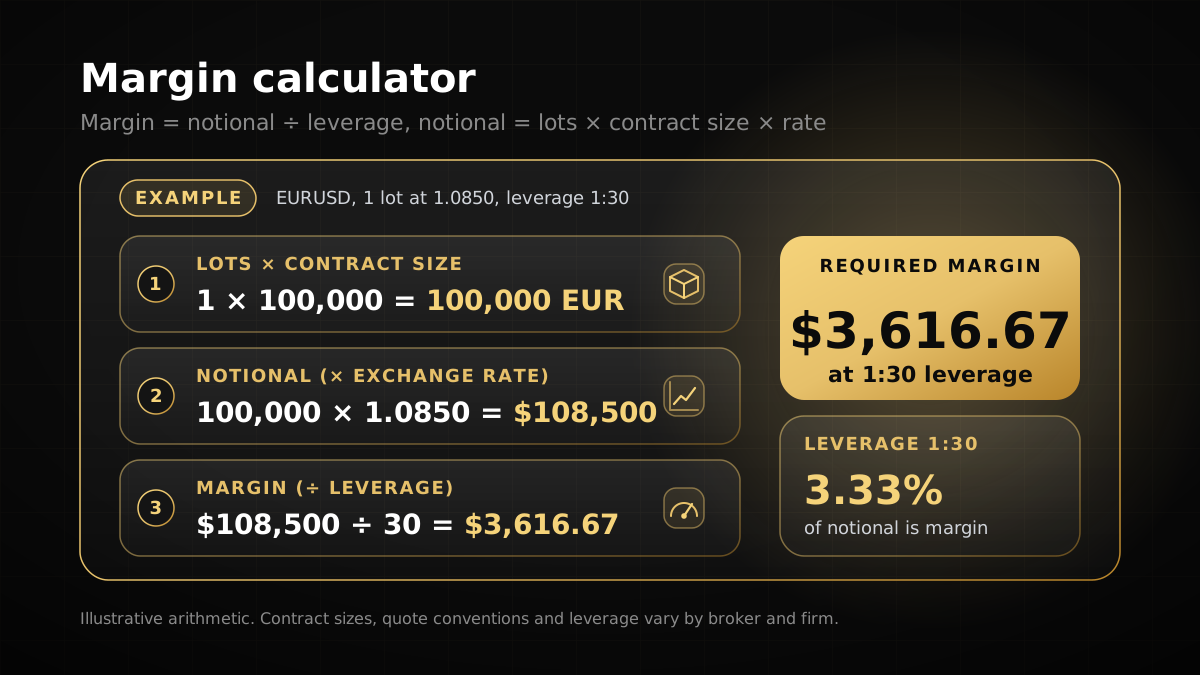
Margin takes two steps. First, find the notional value, which is the total market exposure of the position in your account currency. Second, divide that figure by the leverage ratio. The free margin is what remains of your balance after the margin is set aside.
- Notional value = lots x contract size x exchange rate. For 1 lot at 100,000 units with a rate of 1.0850, that is 1 x 100,000 x 1.0850 = $108,500.
- Required margin = notional value / leverage. For 1:30, that is $108,500 / 30 = $3,616.67.
- Free margin = balance minus required margin. On a $10,000 balance, that is $10,000 - $3,616.67 = $6,383.33, before any floating profit or loss.
The exchange rate converts the base currency into your account currency. On a USD account trading EURUSD, the rate is the EURUSD price, because the base currency is the euro. On a USD account trading USDJPY, the base currency is the US dollar, so the rate is 1. The leverage figure is the number after the 1: in the ratio, so 1:30 means 30.
Two relationships follow directly from the formula. Doubling the lot size doubles the margin. Doubling the leverage halves it. Those are the whole model. Everything else in margin trading depends on the broker’s rules and the account’s loss limits.
What each input means
Each input in the calculator has a single job. Entering the wrong unit for one of them is a frequent reason a margin figure looks wrong, so check each one against your platform before you rely on the result.
| Input | What to enter | Example |
|---|---|---|
| Lot size | The position size in lots | 1.00 (standard), 0.10 (mini), 0.01 (micro) |
| Contract size | Units of the base currency in one lot | 100,000 for a standard forex lot. Read other symbols in MetaTrader 5. |
| Leverage | The number after 1: in the ratio | 30 for 1:30. Use the figure shown for your account. |
| Exchange rate | Base currency price in account currency | 1.0850 for EURUSD on a USD account; 1 when the base currency is the account currency |
| Balance (optional) | Account balance in account currency | 10,000 |
Leverage varies by firm, broker and instrument, so a figure from an article or a forum is not a reliable input. Check the dashboard or platform for the leverage on your own account and symbol. The MetaTrader 5 symbol specification shows the contract size for each instrument.
Worked examples
The three examples below use the same formula. Each one is also a test case in the calculator’s checks, so the figures match what the tool returns.
EURUSD: 1 lot at 1.0850 with 1:30 leverage
The account is in US dollars and the pair is EURUSD, so the rate is 1.0850. Notional value = 1 x 100,000 x 1.0850 = $108,500. Required margin = $108,500 / 30 = $3,616.67. This is the default result in the calculator. If EURUSD moves, the notional value moves with it, and so does the margin, because the leverage stays fixed.
USDJPY: 0.5 lot at 1:100 on a USD account
The base currency is the US dollar, which is also the account currency, so the rate is 1. Notional value = 0.5 x 100,000 x 1 = $50,000. Required margin = $50,000 / 100 = $500. The USDJPY price does not enter this calculation, because the exposure is already stated in dollars. The pip value of USDJPY is a separate question, covered in the position size calculator guide.
GBPUSD: 0.1 lot at 1.2700 with 1:50, on a $10,000 balance
The base currency is British pounds and the account is in US dollars, so the rate is 1.2700. Notional value = 0.1 x 100,000 x 1.2700 = $12,700. Required margin = $12,700 / 50 = $254. Margin as a share of the balance = $254 / $10,000 = 2.54%. Free margin = $10,000 - $254 = $9,746.
| Example | Lots | Leverage | Rate | Notional value | Required margin |
|---|---|---|---|---|---|
| EURUSD, USD account | 1 | 1:30 | 1.0850 | $108,500 | $3,616.67 |
| USDJPY, USD account | 0.5 | 1:100 | 1 | $50,000 | $500 |
| GBPUSD, USD account, $10,000 balance | 0.1 | 1:50 | 1.2700 | $12,700 | $254 (2.54% of balance) |
Margin is not the same as risk
Margin and risk answer different questions. Margin asks how much deposit the position needs. Risk asks how much you lose if the stop loss is hit. The two numbers can be far apart, and confusing them is an easy mistake for new traders to make.
Take the EURUSD example again. One standard lot needs $3,616.67 of margin. If the stop loss sits 25 pips away and each pip is worth $10 on that lot, a stop loss hit at that level costs 25 x $10 = $250. The margin is $3,616.67 and the loss at the stop is $250. The margin sets how much of the balance is tied up. The stop loss and the pip value set how much you lose.
Use both numbers together. The position size calculator turns a risk limit into a lot size from the stop loss. The margin calculator then shows whether the account can hold that size. A position can pass the margin check and still break your risk rule, so the margin check is never a substitute for the risk check.
Margin and prop firm loss limits
A prop firm evaluation has its own loss rules, and margin does not change them. Under the Yo Pips rules page, the limits on each programme are:
| Yo Pips programme | Daily loss limit | Maximum loss limit |
|---|---|---|
| 1-Step Pay Later | 4% | 8% |
| 2-Step Pay Later | 5% | 10% |
| Instant Funding | 3% | 6% |
The rules page measures maximum loss on equity. The daily figure includes closed profit and loss, floating profit and loss, commissions and swaps for the current day, and the daily reset uses UTC. A breach is immediate and closes the account. Checkout and promotion terms take precedence over the rules page, and rules can change, so confirm the current version before you trade.
A large margin figure does not mean a large loss limit, and a small margin figure does not mean a small loss. A position that uses 20% of the balance as margin can still breach a 3% daily limit if the trade loses 3% of the balance. Use the margin calculator to check that the account can carry the position, then use your stop loss and risk per trade to check the loss. For how these limits fit into a plan, see the prop firm challenge guide.
Margin calls and stop outs
On a live brokerage account, a margin call is a warning from the broker that the margin level has fallen below its set threshold. A stop out is the automatic closing of positions, starting with the least profitable, once the margin level falls to a lower threshold. In MetaTrader 5, the margin level is equity divided by the margin in use, shown as a percentage. Thresholds differ by broker and by account type, so read the broker’s own terms.
On a prop firm evaluation, the firm’s loss rules are what end the account. The margin level on the platform is still worth watching, because it shows how much room your open positions leave. Three habits keep a position away from a forced close: keep free margin well above zero, size each trade from the stop loss rather than from the margin figure, and do not add to a losing position to recover a loss.
Common margin mistakes
- Typing the leverage as a percentage. For 1:30, enter 30. Entering 0.03 or 3% gives a margin figure that is wrong by a large factor.
- Using an old exchange rate. The notional value and the margin move with the rate. Update the figure before you rely on a margin number.
- Assuming one contract size for every instrument. Metals, indices and crypto use contract sizes that differ from a forex lot. Read the symbol specification.
- Treating free margin as spare cash. Floating losses reduce equity and the free margin with it, so a trade that is losing can squeeze the account before it closes.
- Reading margin as the cost of a trade. Margin is a deposit that is returned when the position closes. Spreads, commissions, swaps and losses are the real costs of the trade.
Frequently asked questions
01What is a margin calculator?
02How do you calculate forex margin?
03Is margin the same as risk?
04Does higher leverage increase my risk?
05What leverage does Yo Pips offer?
06What happens when margin runs out?
Risk disclosure: Trading leveraged products such as forex and CFDs carries a high level of risk, and most traders lose money. Prop firm challenges are evaluations on simulated accounts; passing one does not guarantee account activation, profits or a payout. Nothing on this page is investment advice. Always read the current rules and terms before you buy or start a challenge.